
● 提供全面的檔案備份、智慧同步及資料復原,確保您的檔案安全無虞。
● 支援硬碟、隨身碟、FTP伺服器及網路分享等多樣儲存目的地。
● 操作介面直觀易用,同時整合多項專業級進階功能供進階使用者。
● 具備複製鎖定檔案、快速備份、聰明同步及高效壓縮等最佳化功能。
● 透過SyncBack Touch免費支援Windows、macOS、Linux與Android跨系統備份。 多語
SyncBackSE 12.0.17.0 for x32
相容於 Windows 的資料同步、備份軟體,可透過網路和 FTP 備份或同步到本地或外部硬碟。
授權性質:共享
使用限制:三十天試用
介面語言:多國語言
作業系統:Windows(10以下)
點閱次數:27,063
下載次數:745
檔案大小:32.83 MB
更新時間:2026/6/23 下午2:35:07
官方網站: 2BrightSparks
軟體重點及亮點
軟體簡介
SyncBackSE 是一個檔案備份及同步備份程式,它能夠與硬碟,重寫 CD 及 DVD(使用 UDF 格式),可移動媒體(如,快閃記憶體 Compact Flash),FTP 伺服器,ZIP 檔案保存,及網路共用等使用。它非常容易使用,但仍包括很多可選功能給予專業的使用者。 SyncBackSE 是 SyncBack 免費軟體的大大增強版本。新特性包含,可複製已鎖住的檔案,更快的備份,聰明的同步,快速的壓縮,更容易的檔案夾及檔案選擇,及一個加強的 FTP 引擎,可支援 SSL 及 Z 模式壓縮。
<font color="red">本版本適用於 Windows 98SE、ME 或 NT 4 之使用者</font>詳細說明介紹
SyncBack 系列產品備份、同步和復原資料檔案。
SyncBackPro、SyncBackSE 和 SyncBackFree 在 Windows(11、10、8、7、Vista - 32/64 位)上工作,並被世界各地的個人、小型企業和組織使用。所有三個程式都可以同時安裝,因此您可以評估哪個最適合您。
SyncBackPro 和 SyncBackSE 還允許您使用適用於 Windows、macOS、Linux 和 Android(手機和設備)的SyncBack Touch跨多個作業系統備份資料。SyncBack Touch 完全免費與 SyncBackPro/SE V10 和更新版本一起使用。
功能比較表
Licensing and OS Compatibility
 Pro V10 Pro V10 |  SE V10 SE V10 |  Free V10 Free V10 | |
|---|---|---|---|
| List Price | US$57.70 | US$41.95 | Free |
| License Type | Perpetual license for the major version number purchased | Freeware | |
| Upgrade Assurance available |  | |  |
| Each license can be installed on up to: | 5 devices (home) or 1 device (business) | No Limit | |
| Supported OS Compatibility | Windows 11, 10, 8, 7, Vista Windows Server 2008 and newer SyncBack Touch supports: macOS, Android, Linux & Windows SyncBack Touch is free to use with SyncBackPro/SE V10 | Windows 11, 10, 8, 7, Vista | |
| 64-bit Version Available | | | |
Supported Protocols
| Pro V10 | SE V10 | Free V10 | |
|---|---|---|---|
| Types of data backup process supported New to V10 Can choose files and/or folders to restore in Restore Wizard | Backup, Fast Backup, Mirror, Intelligent Sync, Restore | Backup, Mirror, Basic Sync, Restore | |
| Support for internal (local drive) and/or external (USB hard drive, thumbdrive, etc.) storage | | | |
| Backup/sync to/from network PC/device (NAS etc.) | | | |
| FTP protocols supported New to V10 Expanded FTP/SFTP support, concurrent downloads for large files (Eldos FTP), IPV6 | FTP / FTPS / SFTP | FTP / FTPS | FTP |
| VHD/X support | | | |
| SyncBack Monitor support | | | |
| SyncBack Touch support New to V10 Free to use, Rapid Transfer | | | |
| Media Transfer Protocol (MTP) | | | |
| Cloud Storage Support Amazon S3™ (and compatible), Backblaze™ B2, Google Storage™, Microsoft Azure™, Microsoft OneDrive™, OneDrive for Business (Office 365), OpenStack, SharePoint™ (Office 365), Dropbox™, Box, SugarSync™, OVH™, hubiC™, Google Photos™, WebDAV and Egnyte™ New to V10 Citrix ShareFile™, pCloud™, S3 object tagging, SSE-C encryption, uses newer Azure API, improved Egnyte performance, reduced memory usage with Box, Google Drive and OneDrive | | | |
| Backup Emails | | | |
Standard Features
| Pro V10 | SE V10 | Free V10 | |
|---|---|---|---|
| Ransomware Detection New to V10 Expanded to also support FTP, SFTP, cloud storage, MTP, VHD, remote file-systems and SyncBack Touch | | | |
| Abort backup if too many changes | | | |
| Central cloud authentication | | | |
| Group profile run New to V10 Improved performance when more than one profile is running, can automatically abort group profile if a profile fails | | | |
| Scheduled Backups | | | |
| Periodic running New to V10 Can specify which times it can start in and on which days of the week | | | |
| Differences window to review proposed changes | | | |
| File Verification | | | |
| Hashing compare method | | | |
| Run external programs before and/or after profiles | | | |
| Multi-language user interface | | | |
| Unicode enabled for multi-language filename support | | | |
| Email Logs New to V10 Faster log file creation | | | |
| Extensive Help File | | | |
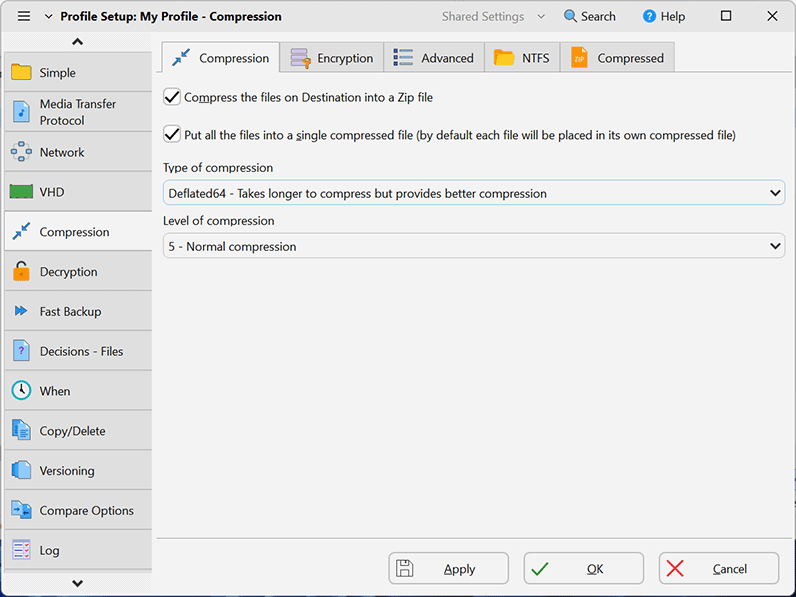
| File Compression | | | |
| Environment Variables | | | |
| Compression | Deflate / Deflate64 / BWT / BZip2 / LZMA | Deflate / Deflate64 / BWT | Deflate |
| Encryption | AES 256-bit | Basic Zip Encryption | |
Advanced Features
| Pro V10 | SE V10 | Free V10 | |
|---|---|---|---|
| Delta-copy | | | |
| File Integrity Checking | | | |
| SyncBack Management Service (SBMS) integration Free with V10 | | | |
| Scripting support | | | |
| Automatic drive failure detection New to V10 Drives tab in Global Settings shows status of all drives | | | |
| New to V10 Can require an Internet or specific network connection | | | |
| Smart memory management for large data set backup jobs New to V10 Can choose to use more or less memory | | | |
| Faster cloud scanning | | | |
| Faster cloud file transfers | | | |
| New file copying methods | | | |
| Choose settings folder | | | |
| Auto-decrypt NTFS files | | | |
| Faster FTP scanning Support for CompleteFTP extension | | | |
| File Resuming if connection lost | | | |
| Run on Windows startup and/or shutdown/logout | | | |
| Real time Backup/Sync when files/folders change | | | |
| Backup/Sync on device insertion (USB drive, etc) | | | |
| Fast Backup feature (reduces scan times) New to V10 Fast Backup now can be used with all cloud services (except Backblaze B2 unless used via the S3 compatibility interface), improved options | | | |
| Incremental & Differential backups | | | |
| File Versioning | | | |
| Bandwidth throttling (FTP and network) | | | |
| Transfer file and folder ACL security (NTFS/ReFS) | | | |
| New to V10 Transfer file and folder last access date & time (NTFS) | | | |
| Copy symbolic links | | | |
| Pushover notification on profile failure | | | |
| New to V10 Webhook notification when profiles finish | | | |
| Regular Expression (RegEx) filter engine New to V10 Improved performance | | | |
| Detect file renames/move | | | |
| Compress email log files | | | |
| Send email logs securely using SSL/TLS connection | | | |
| Move files | | | |
| Automatic profile backups New to V10 Improved performance | | | |
| Advanced Environment Variables New to V10 Global variables, new variables (e.g. VERSIONSCREATEDTOTAL), auto-incrementing variable | | | |
| Copy open/locked files using VSS | | | |
| List Price | US$57.70 | US$41.95 | Free |
如果您覺得此軟體符合您的需求,請點擊下方按鈕前往下載頁面。
立即進入下載頁面軟體截圖參考
該公司的其他軟體
資料讀取中...